A single decorator, @secured("service::name"), turns any FastMCP tool into a blockchain-gated endpoint. No shared secrets, no API keys, no custom auth server. Access is governed entirely by on-chain permissions stored in a WeilChain applet — deployed and managed by your organisation through the Weilliptic CLI.
Introduction
Model Context Protocol (MCP) servers expose powerful tools to AI agents — database lookups, code execution, document search, and more. By default, anyone who can reach the server's HTTP endpoint can invoke those tools. For production deployments this is a serious gap: you need to know who is calling, whether they are allowed to call, and that the answer to both questions is tamper-proof.
The weil_ai package solves this with two composable primitives built on top of the WeilChain blockchain:
| Primitive | Role |
|---|---|
weil_middleware() |
ASGI middleware — verifies a cryptographic signature on every inbound POST and stores the recovered wallet address in a ContextVar. |
@secured(svc_name) |
Decorator factory — checks the wallet address against an on-chain access-control applet and only lets the tool body execute when the chain returns true. |
Together they implement a fully decentralised, cryptographically enforced authorisation layer with zero shared secrets. But the decorator is only half the story. Before any tool can be protected, your organisation must deploy the underlying on-chain permission infrastructure — the Key Management and Identity applets — using the Weilliptic CLI. That infrastructure is what @secured queries at runtime.
This post covers both halves end-to-end: CLI setup by the platform team, and SDK integration by the developer.
How It Works — The Full Picture
< >
>
There are two independent verification stages:
- Authentication (middleware) — proves the caller owns the private key behind the wallet address.
- Authorisation (decorator) — proves the caller is permitted to use this specific service, as recorded on-chain by the organisation.
The Identity applet deployed in step one is exactly what the decorator queries in step seven. The CLI and the SDK are two ends of the same chain.
Part 1: Organisation Setup via the Weilliptic CLI
Before any @secured decorator can enforce access, your platform or DevOps team needs to deploy two security applets and register them in the Weilliptic Name System (WNS). This is a one-time operation per service identity. All subsequent grant/revoke operations are incremental.
Step 1 — Connect to the Sentinel Node
connect -h sentinel.unweil.me
The Sentinel is the WeilChain gateway. All subsequent CLI commands are submitted as signed transactions through it.
Step 2 — Set Up Your Admin Wallet
The wallet used for setup needs to become the first Management key holder. Use an existing BIP39 mnemonic or generate a fresh one:
Load from an existing 24-word mnemonic
wallet setup --use_mnemonic "word1 word2 ... word24"
Or generate a brand-new wallet
wallet setup --generate_mnemonic
Verify the active address
wallet show
The CLI derives keys using the standard BIP39/BIP32 path m/44'/9345'/0'/0/{index}. The resulting wallet address (SHA-256 of the uncompressed secp256k1 public key) is what gets registered as a Management key.
Step 3 — Deploy Security Applets with register_identity_tokens
This is the core setup command. It atomically deploys the Key Management applet to every active WeilPod, deploys the Identity applet to every WeilPod, and registers the Identity applet in WNS under your chosen name (e.g., engg::weil), making it resolvable by name from anywhere on the network.
register_identity_tokens
--key-manager-file-path ./key_manager.wasm
--key-manager-widl-file ./key_manager.widl
--identity-name engg::weil
--identity-file-path ./identity.wasm
--identity-widl-file ./identity.widl
--management-wallet-addresses '["
On success the CLI prints: security is successfully setup with WNS identity name engg::weil
At this point @secured("engg::weil") can resolve and query the Identity applet at runtime.
Step 4 — Grant Execution Access to Agent Wallet Addresses
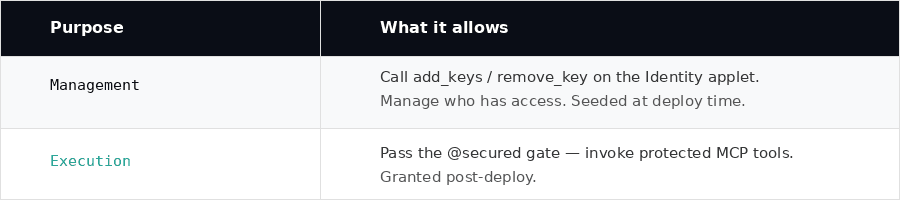
The Identity applet distinguishes two purpose levels:
< >
>
To allow an AI agent or a developer's wallet to call @secured tools, grant it Execution:
set_permissions
--identity-name engg::weil
--purpose Execution
--wallet-addresses '["
To target a specific WeilPod rather than all pods:
set_permissions
--identity-name engg::weil
--purpose Execution
--wallet-addresses '["
Part 2: Developer Integration via weil_ai
With the Identity applet live and permissions set, the Python SDK side is minimal.
1. Server — protecting a tool
# examples/mcp_server.py
import uvicorn
from fastmcp import FastMCP
from weil_ai.mcp import secured, weil_middleware
import json

mcp = FastMCP("my-server")

@mcp.tool()
@secured("engg::weil")          # resolves to the Identity applet by WNS name
async def search(query: str) -> str:
    resp = {"query": query, "result": "Bhavya Bhatt"}
    return json.dumps(resp)

app = mcp.http_app(transport="streamable-http")
app.add_middleware(weil_middleware())   # verifies wallet signature on every POST

if __name__ == "__main__":
    uvicorn.run(app, host="0.0.0.0", port=8001)
The string "engg::weil" passed to @secured is the exact WNS name registered by register_identity_tokens. The decorator resolves it to a ContractId at call time and invokes key_has_purpose with the caller's wallet address and "Execution" purpose.
The decorator order matters: @mcp.tool() must be outermost so FastMCP registers the wrapper, and @secured(...) sits directly on the function so it runs before the tool body.
2. Client — signing requests
Callers must attach four authentication headers derived from their wallet's private key:
# examples/mcp_client.py
from weil_wallet import PrivateKey, Wallet, WeilClient
from weil_ai.auth import build_auth_headers
from mcp.client.streamable_http import streamablehttp_client
from mcp.client.session import ClientSession

pk = PrivateKey.from_file("private_key.wc")
wallet = Wallet(pk)
client = WeilClient(wallet)

# build_auth_headers signs {"timestamp": ts} with the wallet's secp256k1 key
headers = build_auth_headers(client._wallet)

async with streamablehttp_client("http://localhost:8001/mcp", headers=headers) as (read, write, _):
    async with ClientSession(read, write) as session:
        await session.initialize()
        tools = await load_mcp_tools(session)
        # build and run your LangChain / LangGraph agent
The wallet address in X-Wallet-Address must be one that was granted Execution purpose via set_permissions. If it was never added — or was revoked via remove_permissions — the Identity applet returns false and the tool call is rejected with an MCP error before the handler body runs.
3. Auth header anatomy
| Header | Content | Purpose |
|---|---|---|
X-Wallet-Address |
SHA-256 of uncompressed secp256k1 pubkey (hex) | Identity claim |
X-Signature |
64-byte compact r‖s secp256k1 signature (hex) |
Proof of key ownership |
X-Message |
Canonical JSON string that was signed | Replay-safe signed payload |
X-Timestamp |
Unix seconds (string) | Anti-replay window anchor |
The middleware verifies by recovering the secp256k1 public key from (signature, SHA256(message)), deriving the address, and comparing with X-Wallet-Address. No shared secret ever leaves the client. The 5-minute timestamp window prevents captured headers from being replayed.
4. Accessing the caller's identity inside a tool
from weil_ai.mcp import current_wallet_addr

@mcp.tool()
@secured("engg::weil")
async def search(query: str) -> str:
    caller = current_wallet_addr()   # the verified wallet address, available post-middleware
    # use for per-caller logging, personalisation, quota enforcement, etc.
    ...
current_wallet_addr() reads from the ContextVar set by the middleware. Because uvicorn runs each HTTP request in its own asyncio task, concurrent requests never see each other's values — no locking needed.
Advantages
Zero shared secrets — The only credential is the caller's private key, which never leaves their machine. The server holds nothing sensitive.
Tamper-proof, auditable permissions — Permissions live in a WeilChain Identity applet, not in a config file or database. Every set_permissions and remove_permissions call is a signed, immutable on-chain transaction.
Organisation-controlled, developer-transparent — Platform teams own the CLI and the Management keys. Developers consuming the API simply annotate their tools with no knowledge of the underlying key management infrastructure required.
Cryptographic identity, not network identity — Wallet-based auth ties access to who signed the request, not where it came from. A client can move networks or roam between data centres and still prove the same identity.
Replay protection built in — The 5-minute timestamp window makes captured headers useless after a short window, without requiring per-request nonce tracking.
Sharded by design — Key Management and Identity applets are deployed to every WeilPod. Permissions are consistent across the entire network without a centralised auth database.
Async-safe, request-isolated context — Python's ContextVar gives each asyncio task its own slot. Concurrent requests never interfere — no global state, no thread-local hacks.
Fine-grained, service-scoped access control — Each @secured("service::name") checks permissions against a specific Identity applet. A wallet can hold Execution for "engg::weil" but not "finance::payroll".
Summary
End-to-end, the @secured system spans two layers.
Organisation layer (CLI): register_identity_tokens deploys the Key Management and Identity applets, registers them in WNS, and seeds the initial Management key holders. set_permissions and remove_permissions grant and revoke access — every change is a signed, immutable on-chain transaction.
Developer layer (SDK): weil_middleware() verifies the caller's cryptographic signature on every request. @secured("engg::weil") resolves that WNS name to the on-chain Identity applet and calls key_has_purpose before the tool body runs. Two lines of Python integration code; zero shared secrets; tamper-proof access control enforced by the chain.
Together they deliver a production-grade, blockchain-enforced authorisation layer for MCP tools where the platform team owns the keys and the developer owns the decorator — and neither has to trust the other.